

How does planet mass affect orbit velocity?
The Earth takes a bit more than 365 days to complete one orbit around the Sun. Mercury orbits the Sun in only 88 days, but Pluto takes more than 90,000 days. Why are the periods of planetary orbits so different?
One factor is the distance each planet must travel in its circuit. The Earth is about 2.5 times more distant from the Sun than Mercury, so the circumference of its orbit is about 2.5 times larger. Does that mean that Earth's orbital period is 2.5 times longer? Let's see; the actual ratio is (365 days / 88 days) = 4.1 times longer. Hmmm. And Pluto's journey around the Sun is about 40 times farther than the Earth's, yet it takes Pluto roughly 247 times longer to make the trip. It seems that the size of the orbit alone can't explain the period. What else could be happening?
Kepler developed his 3rd Law based on solar system observations and he had no way to know what the effects of having different solar masses might be. Newton solved the general problem, and took mass into account and came up with a modified 3rd law: p2 = a3/(M+m), where M and m are the star and planet masses respectively. In choosing the Earth orbit to set the scales for the Solar System, Kepler was using M = 1 without realizing it, and since planets are so small when compared to their stars, the ‘M + m’ factor was essentially 1.
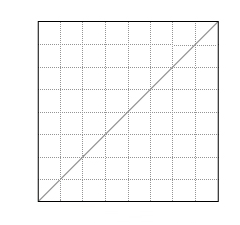
Therefore, for different central stars, planetary systems will give a straight line when plotting p2 vs a3, but the slope of the line is 1/M; the bigger the star the smaller the slope. If p2 vs a3 is plotted for 3 different planetary systems with 3 different mass stars, 3 straight lines would result with 3 different slopes. However, if p2 is plotted against a3/M, all objects for all systems would appear on the one line!
Your goal is to explore the differences between Kepler’s original equation for orbital velocity and Newton’s modification that included mass.
There are several control options:
- Adjust the Star’s Mass.
- Change the Orbit Radius of Earth.
- Choose between graphing Kepler’s original 3rd Law (using a3) or Newton’s Modified version (using a3/M).
- Clear the graph of all the points you have plotted so far. Screen reader users: The clear graph and play/pause buttons are for the visuals only.
The color of each dot represents stellar mass, so that you can isolate the effects of a change in orbital size (look at all dots of the same color) from a change in stellar mass (look at all the dots in the same vertical position.)
If sound is on, higher tones indicate faster planetary movement. You can turn the sound off in the top of the window in the banner region.
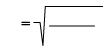
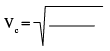
Notes: The Sun and Earth are drawn much larger than their true sizes, relative to the size of the orbit. Because the interactive measures orbital radius in Astronomical Units, mass in solar masses, and velocity in kilometers per second, the gravitational constant "G" has a value of about 890; this is very different from the usual textbook value (based on units of meters, kilograms, and meters per second, respectively.)
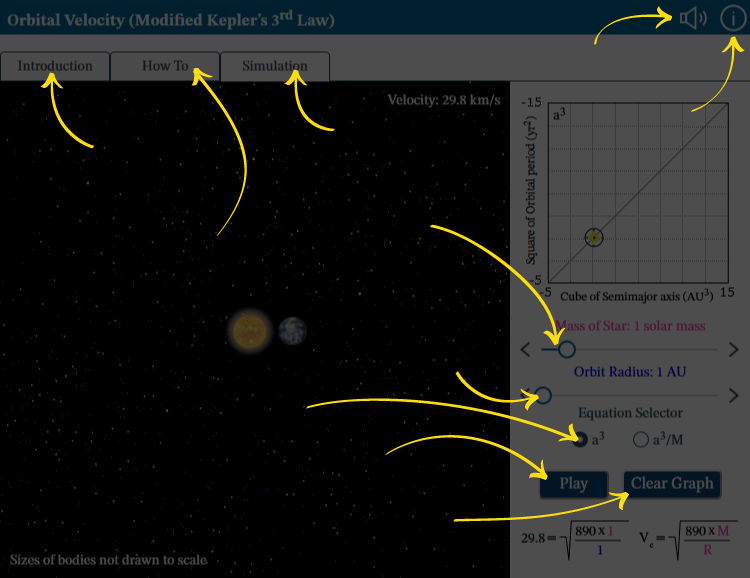
Your goal is to explore the differences between Kepler’s original equation for orbital velocity and Newton’s modification that included mass. Interact with the mass of star and orbit radius sliders to hear a description of the current state and the graphed trends. This simulation is divided into 3 regions:
- Title banner with the audio on/off and info buttons.
- Navigation options.
- Controls region where you can change the mass of star, planet’s orbit radius, and which version of the orbital velocity equation is graphed.
Visit the How To tab for details.
Audio: Turn sounds off or on. See How To tab for details on what the sounds indicate.
Information: Reopen this overview screen.
Introduction tab contains background information about the subject of the simulation.
How To tab contains detailed information about how to use the simulation.
Simulation tab contains the simulation.
Mass of Star: Adjust the value using the left and right arrows or by dragging the circle.
Orbit Radius: Adjust the value using the left and right arrows or by dragging the circle.
Equation Selector: Choose to graph either Kepler’s original law or Newton’s modification.
Play or Pause: Start and stop the action in the simulation.
Use Clear Graph to remove all plotted points and start again.
