

Space is big … really big. The distance between the Earth and Moon is hundreds of thousands of kilometers. The distance between the Earth and Sun is over a hundred million kilometers. But these are nothing compared to the distance between stars. For thousands of years, astronomers could tell that the stars were much, much more distant than any of the planets, but couldn't actually measure the gulf. Why not?
The method to use was obvious: trigonometric parallax. It may sound complicated, but it's really quite simple: look very carefully at an object from two different vantage points. As you move from one spot to the other, the target object will appear to shift position slightly, relative to more distant objects in the background. If you know the distance between the observation sites, and you can measure the angle by which the target shifts, you can use trigonometry to determine its distance. Scientists had tried this for centuries, but had always failed because the angular shifts were just too small to see.
Finally, in the eighteen-thirties, several astronomers -- Friedrich Bessel, Friedrich von Struve, and Thomas Henderson -- managed to detect the tiny angular shifts of three stars. Their success was due in part to advances in telescope technology, in part due to their cleverness in picking stars which were likely to be nearby, and in part due to their persistence and hard work. They showed that the typical distance between the Sun and nearby stars is enormous: hundreds of thousands of Astronomical Units.
Parallax is inversely proportional to distance
Your goal is to explore why stars seem to shift position from one time of the year to the next and how that shift is used to measure the star’s distance from the Sun. Discover how the triangle from Earth to Sun to target star changes in the main view and how that relates to the Star’s apparent Movement as Seen on Earth.
There are two control options. Change the distance between Earth and the target star. And choose the star’s ecliptic latitude, as seen from Earth. 90 degrees means head-on, 0 degrees is straight overhead.
If the sound is on, the tone changes to indicate the star’s apparent movement. The highest tone indicates the star reaching the far left point of its apparent movement and the lowest tone indicates it reaching the far right point. Beeps indicate when the Earth reaches the extreme left and right its orbit relative to a line drawn from the Sun to the target star. You can turn the sound off in the top of the window in the banner region.
Notes: This interactive will give you a general idea of how trigonometric parallax works, but beware: it does not provide an accurate picture of the real situation. The distances involved are so large, and the angular shifts so small, that if everything were drawn to scale accurately, you wouldn't be able to see the Earth, or an angle at all. In addition, this simulation depicts angle measurements being taken in January and July but any pair of months that are half a year apart would work just as well.
Your goal is to explore why stars appear to shift position during the year and how that shift is used to measure the star’s distance. If the sound is on, the tone changes to indicate the star’s apparent movement. The higher the tone, the farther left the star appears to have shifted. The lower the tone, the farther right. Beeps indicate when the Earth reaches the extreme left and right of its orbit relative to a line drawn from the Sun to the target star.
This simulation is divided into 3 regions: First, the title banner with the audio on/off and info buttons. Second, the navigation options. Third, the main controls region where you can adjust the distance from the Sun to the target star and the ecliptic latitude of the star relative to Earth. Visit the How To tab for details.
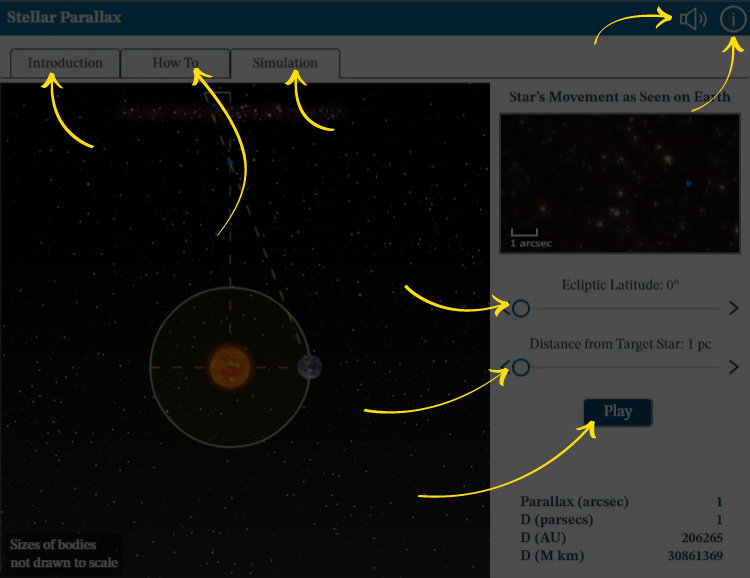
Audio: Turn sounds off or on. See How To tab for details on what the sounds indicate.
Information: Reopen this overview screen.
Introduction tab contains background information about the subject of the simulation.
How To tab contains detailed information about how to use the simulation.
Simulation tab contains the simulation.
Ecliptic Latitude: Adjust the value using the left and right arrows or by dragging the circle.
Distance from Target Star: Adjust the value using the left and right arrows or by dragging the circle.
Play or Pause: Start and stop the action in the simulation.
