

If you toss a ball up gently, it may rise two meters in the air before falling back. If you throw a ball upwards as hard as you can, it might rise to a height of twenty meters. How fast must a ball be thrown in order to reach an altitude of one hundred meters? One thousand meters? One million meters? Is it possible to throw a ball up so fast that it never comes back down again?
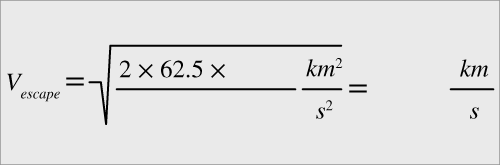
If we throw a ball sufficiently fast, it will break free from Earth’s gravity and be able to travel away from Earth forever. This speed is called the “escape velocity” (Ve) and its equation is derived by equating kinetic energy with potential energy. Essentially, an object travelling at escape velocity when it leaves the Earth’s surface will finally slow down to zero at an infinite distance—it never falls back to Earth. The formula is $V_{escape} = \sqrt{\frac{2GM}{R}}$. Here, R is the distance between the center of the Earth (or other planet) and the object. If we convert the units of the planet’s mass M, and the distance R, so that they are expressed in units of Earth masses and Earth radii, and also convert the units on G appropriately, the formula simplifies to \( V_{escape} = \left( \sqrt{\frac{2 \times 62.5 \times M}{R}} \right) \frac{km}{s} \).
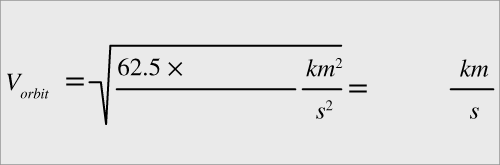
The speed needed for a stable circular orbit (Vo) at a particular distance R from the planet’s center can be calculated by balancing centripetal force with gravitational force, and has a very similar formula to the formula for escape velocity: $: V_{orbit} = \sqrt{\frac{GM}{R}}.$ Again M is the planet’s mass and R is the distance from the center to our orbiting object. The formulas differ only by a constant: escape velocity is $\sqrt{2}$ times the orbital velocity, or about 1.4 times larger. If we again convert units, we have $V_{orbit} = \left( \sqrt{\frac{62.5 \times M}{R}} \right) \frac{km}{s}$, with M and R again expressed in Earth masses and Earth radii. If the horizontal speed at a certain distance R is smaller than Vo for that distance, the rocket will be on an elliptical orbit that is smaller than the circular orbit. If the horizontal speed is larger than Vo and less than Ve, it will be on a larger elliptical orbit. If it is larger than Ve, the horizontal rocket will escape! You can see all of these behaviors in the interactive.
Since both Ve and Vo are related to the force of gravity wherever the rocket is, like gravity they vary with distance from the center of the planet. The higher up your rocket is, the smaller velocity it needs to escape (or orbit). It is interesting to realize that Ve does not depend on the launch angle. A rocket launched horizontally in excess of Ve will still escape (on a curved, rather than a straight, trajectory). You can see all of this in the interactive.
The interactive shows two rockets, one travelling vertically and one launched horizontally, to demonstrate the different trajectories that result depending on how their speeds compare with Ve and Vo at the launch distance. We ignore air resistance and any effects of fuel consumption.
Your goal is to explore what happens when the initial velocity is at, above, or below orbital or escape velocity, for horizontally or vertically launched rockets. When you press “Play,” two rockets launch with the same velocity, one vertically and one horizontally.
You can select:
- The initial velocity of the rockets, in km/s.
- The mass of the planet, in Earth masses. Presets are available for Mercury, Venus, Earth, and Mars using the buttons below the sliders, and you can also adjust the mass further with the slider.
- The distance from the center of the planet to the point where the rockets launch (which can be above the surface). This is always measured in Earth radii, so for Earth, the smallest launch distance is 1.0 R, but if you select a smaller planet, the smallest possible launch distance will be less. The height of the launch point above the surface of the current planet is also displayed (in km).
As explained in the Introduction panel, the circular orbit and escape velocities (Vo and Ve) depend on the planet’s mass and distance from the planet’s center to the launch point. Their values are calculated for you in the “Formulas Region” of the interactive. You can see that the escape velocity is $\sqrt{2}$ times the orbital velocity. (Note the distance is often represented by “R” in equations, for radius from the center of the planet.)
- Pressing “Play” will start the rockets in motion; the view will zoom out as necessary, and various parameters for each rocket (current velocity, current distance, and time) are shown on the display. The time values are real for the velocities and distances but the motion is sped up in the interactive.
- Pressing the same button (now “Pause”) will pause the flights, and press again to resume the flight.
- “Reset Rockets” will end the current simulation so you can change your selections and/or start again.
The “Sound Selector” plays beeps based on flight of the horizontal or vertical rocket. The pitch indicates height: the higher the pitch, the farther the rocket is from the center of the planet. The speed of the beeping indicates the velocity: the faster the beeping, the faster the rocket.
Your goal is to explore what it takes both to keep a rocket in orbit around a planet (orbital rocket, launching horizontally) and to escape the planet’s gravitational pull completely (escape rocket, launching vertically).
This simulation is divided into 4 regions: First, the title banner with the audio on/off and the info buttons. Second, the navigation options. Third, the main controls region where you can adjust the rocket and planet settings. Finally, the formulas region showing the escape and orbital velocity calculations based on your current settings. Visit the How To tab for details.
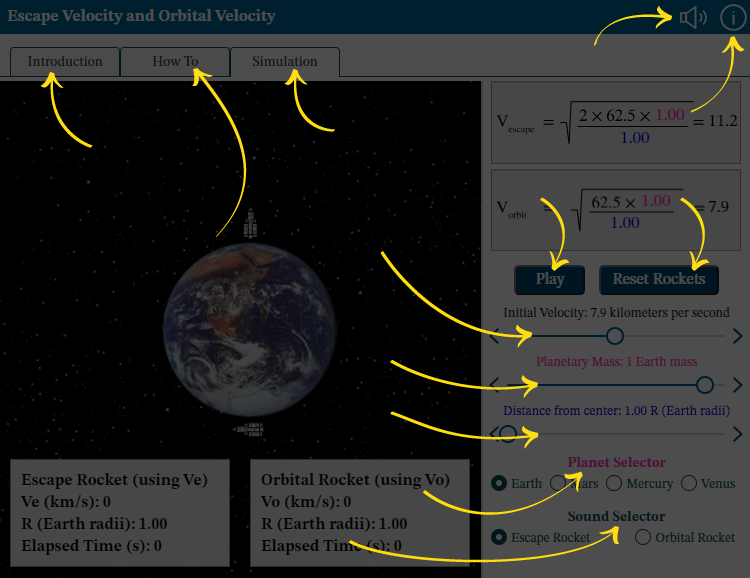
Audio: Turn sounds off or on. See How To tab for details on what the sounds indicate.
Information: Reopen this overview screen.
Introduction tab contains background information about the subject of the simulation.
How To tab contains detailed information about how to use the simulation.
Simulation tab contains the simulation.
Play or Pause: Start and stop the action in the simulation.
Use Reset Rockets to return the rockets to their starting positions.
Initial Velocity: Adjust the value using the left and right arrows or by dragging the circle.
Planetary Mass: Adjust the value using the left and right arrows or by dragging the circle.
Distance from center: Adjust the value using the left and right arrows or by dragging the circle.
Planet Selector: Choose the planet for the simulation.
Sound Selector: Choose either the sound for the escape rocket or the orbital rocket.
